
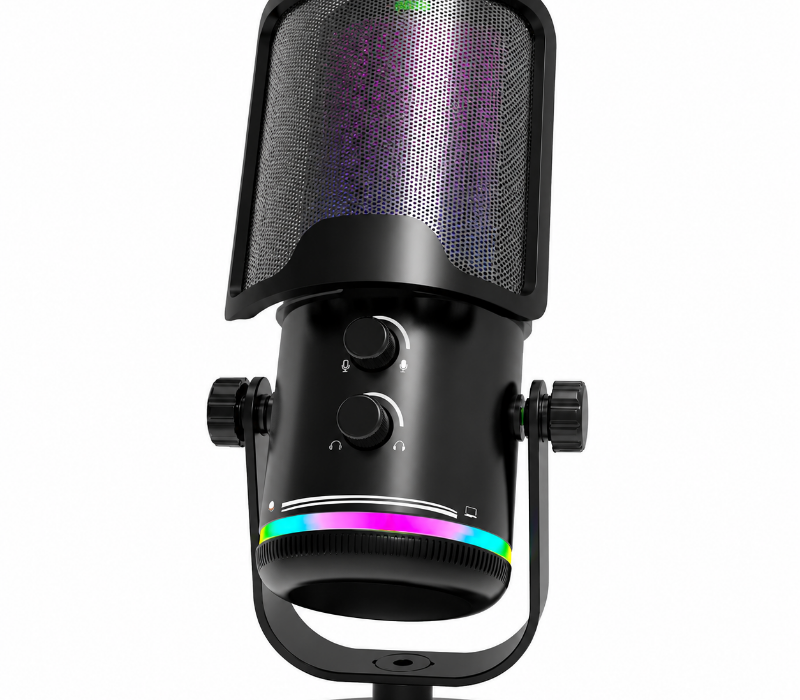
Clear audio can make a big difference whether you're gaming with friends, streaming live, recording YouTube videos, or talking with people online.
You don't necessarily need an expensive studio microphone to get better sound. The right microphone for your setup depends on how you use it, the environment you record in, and the features that matter most to you.
In this guide, we'll explain what to look for when choosing a gaming microphone, streaming microphone, or microphone for YouTube and online communication.
Why Is a Good Microphone Important for Gaming and Streaming?
Your microphone is responsible for making your voice clear to other people.
During gaming, a good microphone helps teammates hear your callouts without constantly asking you to repeat yourself. For streaming and YouTube, clear voice audio can make your content easier and more enjoyable to listen to.
A microphone can also help separate your voice from other sounds around your gaming setup, such as keyboard clicks, mouse movements, fans, and background conversations.
However, buying an expensive microphone isn't the only way to improve your audio. Microphone placement, gain settings, and your recording environment can have a significant effect on the final result.
What Should You Look for in a Gaming Microphone?
Before choosing a microphone, consider these key factors:
- Microphone type
- USB or XLR connection
- Pickup pattern
- Background-noise handling
- Microphone placement
- Built-in controls
- Compatibility
- Size and desk setup
- Your gaming or streaming environment
Let's look at each one.
1. USB vs. XLR Microphones
One of the first decisions is choosing between a USB and XLR microphone.
USB Microphones
USB microphones connect directly to your computer or compatible device.
They are popular for gaming, streaming, online chat, and YouTube because they are generally easy to set up without additional audio equipment.
A USB microphone can be a practical choice if you want:
- Simple setup
- Plug-and-play convenience
- Gaming and voice chat
- YouTube recording
- Live streaming
- A compact desktop setup
For many gamers and new content creators, a USB microphone provides a straightforward way to upgrade from a basic headset microphone.
XLR Microphones
XLR microphones are commonly used in more advanced audio setups.
They typically require an audio interface or another compatible device, which gives you more flexibility over your audio chain.
XLR can make sense if you:
- Already have an audio interface
- Want more control over your audio setup
- Record multiple audio sources
- Plan to build a more advanced recording environment
If you're just starting gaming or streaming, however, you may not need an XLR setup.
2. Dynamic vs. Condenser Microphones
The microphone type can also affect how much sound is picked up from your environment.
Dynamic Microphones
Dynamic microphones are often a practical choice for gaming and streaming in rooms that aren't acoustically treated.
They tend to be less sensitive to distant sounds, which can help reduce the amount of room noise captured by the microphone.
They can work well for:
- Gaming
- Live streaming
- Voice chat
- Noisy rooms
- Keyboard-heavy gaming setups
Condenser Microphones
Condenser microphones are generally more sensitive and can capture more detail from your voice and surrounding environment.
They can be a good option when you're recording in a relatively quiet room and want a detailed vocal sound.
They are commonly used for:
- YouTube videos
- Streaming
- Podcasts
- Voice recording
- Content creation
The important thing is that neither type is automatically right for everyone. Your room and recording environment should influence your decision.
3. Consider the Pickup Pattern
A microphone's pickup pattern describes the direction from which it captures sound.
For gaming and streaming, cardioid is a common choice.
A cardioid microphone primarily focuses on sound coming from the front while reducing sound from the sides and rear.
This can be useful when your microphone is positioned in front of you at a gaming desk.
Other pickup patterns can be useful in different situations, such as recording multiple people, but most solo gamers and streamers can start by looking at a microphone with a directional pickup pattern.
4. Microphone Placement Matters
Even a good microphone can sound poor if it is positioned incorrectly.
A common mistake is placing the microphone too far away and increasing the gain to compensate. This can cause the microphone to capture more room noise, fans, keyboard sounds, and other background noise.
Instead, position the microphone at a comfortable distance from your mouth and adjust the input level so your voice is clear without clipping.
A boom arm can also make positioning easier by allowing you to move the microphone closer when speaking and away when you're not using it.
5. Reduce Keyboard and Background Noise
Gaming setups can be surprisingly noisy.
Your microphone may pick up:
- Mechanical keyboard sounds
- Mouse clicks
- PC fans
- Air conditioning
- Room conversations
- Controller buttons
- Desk vibrations
Choosing a microphone with an appropriate pickup pattern and positioning it correctly can help.
You can also use software features such as noise suppression, noise gates, and compression to improve your voice audio. However, aggressive processing can sometimes make your voice sound unnatural, so it's worth testing your settings before going live.
6. Gaming Microphone vs. Headset Microphone
Do you actually need a separate microphone?
Not necessarily.
A gaming headset with a built-in microphone can be a convenient option if you want an all-in-one setup.
A standalone gaming microphone may be worth considering if:
- You stream regularly
- You create YouTube videos
- You record voiceovers
- You want more control over microphone placement
- You want to upgrade your voice quality
- You already use separate headphones or earbuds
For a simple gaming setup, a headset microphone can be enough. For creators who put more emphasis on voice quality, a dedicated microphone offers additional flexibility.
7. Gaming Microphone for Streaming
Streaming requires a microphone that can keep your voice clear while other audio is playing.
During a live stream, you may have several audio sources:
- Your voice
- Game audio
- Music
- Discord or team chat
- Alerts and notifications
Your microphone should make your voice easy to understand without overwhelming the rest of the stream.
A good starting setup is to position the microphone close enough to capture your voice clearly, set an appropriate input level, and test your game and microphone volume together before going live.
8. Gaming Microphone for YouTube
YouTube creators have different needs depending on the type of content they make.
A microphone can be used for:
- Gaming commentary
- Tutorials
- Reviews
- Voiceovers
- Live videos
- Podcasts
- Product demonstrations
If your videos are primarily voice-based, clear and consistent speech should be one of your main priorities.
You don't necessarily need a professional studio setup. A suitable microphone, quiet recording environment, and careful microphone placement can go a long way.
9. Microphones for Discord and Online Social Chat
A dedicated microphone isn't only useful for content creators.
If you regularly use Discord or other online communication platforms, a good microphone can make conversations clearer for your friends and teammates.
For online chat, you may want to prioritize:
- Clear voice reproduction
- Simple controls
- Easy setup
- Background-noise handling
- Comfortable positioning
A microphone with a mute button can also be convenient when you need to quickly mute yourself during a game or conversation.
10. Look for Convenient Controls
Depending on your setup, built-in controls can make a microphone easier to use.
Useful features may include:
- Mute button
- Headphone monitoring
- Volume control
- Gain control
- RGB lighting
- Adjustable stand
- Boom-arm compatibility
Not every gamer needs all of these features.
Choose the controls that actually fit the way you use your microphone.
11. Don't Focus Only on "Studio Quality"
You may see microphones advertised with terms such as "studio quality" or "professional sound."
Instead of relying only on marketing terms, look at the actual features and how they fit your setup.
Ask yourself:
- Is the microphone suitable for my room?
- Is it easy to connect?
- Does it have the controls I need?
- Can I position it close enough to my mouth?
- Does it work with my computer or gaming setup?
- Is it comfortable to use during long sessions?
A microphone that fits your environment can be more useful than one with impressive specifications that don't match your needs.
Gaming Microphone Buying Checklist
Before buying a microphone, consider:
Gaming:
Do you need a microphone mainly for team chat and multiplayer games?
Streaming:
Will you be speaking continuously while playing?
YouTube:
Will you record commentary, tutorials, reviews, or voiceovers?
Online Chat:
Do you need clear communication for Discord and other social platforms?
Room:
Is your gaming space quiet or does it have background noise?
Connection:
Do you want the simplicity of USB or the flexibility of an XLR setup?
Microphone Type:
Would a dynamic or condenser microphone better suit your environment?
Placement:
Can you position the microphone close enough to your mouth?
Controls:
Would a mute button, volume control, or headphone monitoring be useful?
Final Thoughts
The right microphone for gaming, streaming, YouTube, or online communication doesn't have to be complicated.
Start with your actual needs.
If you want a simple setup, a USB microphone can provide an easy way to improve your gaming and streaming audio. If you have a noisy gaming room, a microphone that handles background sound well may be more important. If you're building a more advanced content-creation setup, an XLR microphone and audio interface may provide additional flexibility.
Most importantly, don't overlook microphone placement. Keeping the microphone at an appropriate distance and setting the gain correctly can make a significant difference in how your voice sounds.
At GameGearPrime, we make it easier to explore gaming and creator gear designed for gaming, streaming, online communication, and content creation.
Explore our Gaming Microphones collection and find a microphone that fits your setup.
Frequently Asked Questions
What is the best microphone for gaming?
The right gaming microphone depends on your room, connection preference, gaming setup, and how you use it. For many gamers, a simple USB microphone is an easy starting point.
Is USB or XLR better for streaming?
USB is generally simpler to set up, while XLR provides more flexibility for advanced audio setups. Your experience level and equipment should determine which is more suitable.
Is a dynamic or condenser microphone better for gaming?
Dynamic microphones can be useful in rooms with background noise, while condenser microphones can capture more detail in quieter environments. Neither is universally better.
Do I need a separate microphone for YouTube?
Not necessarily. A headset microphone can work for basic content, but a dedicated microphone can provide more control over voice recording and microphone placement.
What microphone is good for Discord?
A microphone with clear voice pickup, simple controls, and good background-noise handling can work well for Discord and other online communication platforms.
How can I make my gaming microphone sound better? Start with microphone placement and gain settings. Position the microphone appropriately, avoid excessive gain, and test your audio before streaming or recording. Software features such as noise suppression and compression can also help when used carefully.